Samsung QN55LS03HE vs Samsung QN55LS03H: Is The Frame Pro Worth the Step Up?
Last updated: August 2026
🕒 10 min read
Disclosure: As an Amazon Associate I earn from qualifying purchases. This article contains affiliate links — we may earn a small commission if you buy through them, at no extra cost to you.
The name “Pro” usually promises a clean upgrade — more of everything, no real trade-offs. In the Samsung QN55LS03HE vs Samsung QN55LS03H matchup, that promise gets complicated. Both TVs share the same 55-inch art-TV concept, the same matte glare-free screen, and even the same 144Hz refresh rate on paper.
What separates them is narrower than the price gap suggests, and in one respect the cheaper model comes out ahead. Based on RTINGS testing data and Samsung’s own 2026 spec sheets, the Frame Pro wins on brightness and picture quality, but the standard Frame answers back with lower input lag and cleaner motion — a split that doesn’t map neatly onto “Pro is just better.”
This comparison sticks to these two 55-inch models specifically. If you’re weighing a same-brand, different-tier decision more broadly, our Samsung 48S85H vs Samsung 48S90H comparison works through the same kind of step-up question on Samsung’s OLED side.
Table of Contents
Depends on how you’ll use it — Frame Pro for brightness and art-mode pop, base Frame for gaming
The Samsung QN55LS03H (Frame Pro) measures roughly 80% brighter in peak HDR highlights and adds a basic local dimming feature the standard Frame doesn’t have at all. But RTINGS’ testing found the Frame Pro’s Wireless One Connect box adds noticeable input lag on its main HDMI ports, and its motion clarity trails the cheaper Frame in RTINGS’ own tests. Which one wins comes down to whether brightness or gaming responsiveness matters more in your room.
How They Compare
Picture Quality
Gaming
Design & Installation
Value
BUY THE FRAME IF…
› Gaming responsiveness and low input lag matter most
› The wall stays mostly in Art Mode with occasional viewing
› You want the same core panel for a lower price
BUY THE FRAME PRO IF…
› Bright-room HDR movies are a regular part of how you’ll use it
› A cable-free wall mount matters more than gaming latency
› Some local dimming beats none, even if it’s basic
Ready to act on that verdict? See our picks for our Samsung Crystal UHD buying guide →.
Samsung QN55LS03HE vs Samsung QN55LS03H: How They Actually Differ
What Is the Samsung QN55LS03HE (The Frame)?
The QN55LS03HE is Samsung’s entry-level 2026 Frame — a 55-inch QLED TV built around Art Mode and a customizable bezel rather than raw picture-quality specs. It uses a VA LCD panel with Samsung’s Dual LED edge lighting and no local dimming at all, so contrast depends entirely on the panel’s native black level.
All four HDMI 2.1 ports sit directly on the back of the panel. Our own Samsung QN55LS03HE review covers this exact model in more depth if you’re deciding between this size and a bigger Frame in the same tier.
What Is the Samsung QN55LS03H (The Frame Pro)?
The QN55LS03H sits one tier up as the Frame Pro — the same Art Mode concept, but built on Neo QLED with Mini LED backlighting and a basic edge-lit local dimming system. It also swaps the built-in ports for a Wireless One Connect box, which transmits video to the panel so only a power cable stays visible on the wall.
RTINGS tested the 65-inch Frame Pro and applied the results across the lineup, including this 55-inch model. Our Samsung QN65LS03H review covers that testing in more depth if you’re also considering a larger Frame Pro size.
The Key Structural Difference
Both TVs use a VA LCD panel with a Quantum Dot layer, both list a 144Hz native refresh rate, and both skip Dolby Vision in favor of HDR10+. RTINGS’ color testing measured near-identical total DCI-P3 coverage — 86.45% on the Frame Pro versus 86.16% on the standard Frame, a difference of under one percentage point.
But RTINGS’ panel testing also found the Frame Pro uses a newer panel structure with better-isolated color primaries, while the standard Frame’s spectral peaks overlap more between green and red, causing some crosstalk. In practice, the two panels cover almost the same gamut, but the Frame Pro renders it a bit more precisely.
Picture Quality: Local Dimming vs. No Dimming at All
The Frame Pro’s local dimming is real, but it’s not the kind of upgrade the name implies. RTINGS’ testing found it uses an edge-lit system with limited zone precision — most of the backlight stays on together for typical content, and the feature does little to deepen black levels versus running with it off, which isn’t even an option on this TV.
The standard Frame skips local dimming entirely. Its native contrast ratio measured well in isolation, but with no way to dim dark areas of the screen, blacks stay visibly raised in a dim room regardless of what’s on screen. Neither TV is a strong pick for movie nights with the lights off — the Frame Pro is just less bad at it.
Where the Frame Pro Actually Pulls Ahead
The gap that matters more shows up in brightness, not contrast — which is where the next section picks up.
Brightness & HDR Highlights: Frame Pro’s Clearest Win
This is the dimension where the price difference earns its keep. RTINGS measured the Frame Pro’s HDR output at roughly 769 cd/m² on a hallway highlight pattern, versus about 427 cd/m² for the standard Frame — about 80% brighter. The gap holds up across the smaller test windows too: the Frame Pro’s landscape-pool reading (294 cd/m²) runs around 65% higher than the standard Frame’s (178 cd/m²), and its yellow-skyscraper measurement is roughly 30% brighter.
What This Looks Like in Real Content
HDR highlights — sunlight through a window, a bright sky, a lens flare — stand out more clearly on the Frame Pro, while the standard Frame’s HDR scenes read flatter and less dimensional. In SDR, both TVs get bright enough to handle typical daytime glare, so the brightness gap narrows considerably outside of HDR content.
For full test conditions and every brightness figure RTINGS recorded, RTINGS’ Samsung The Frame 2026 review breaks down each measurement window in detail.
Design & Installation: Wireless Box vs. Built-In Ports
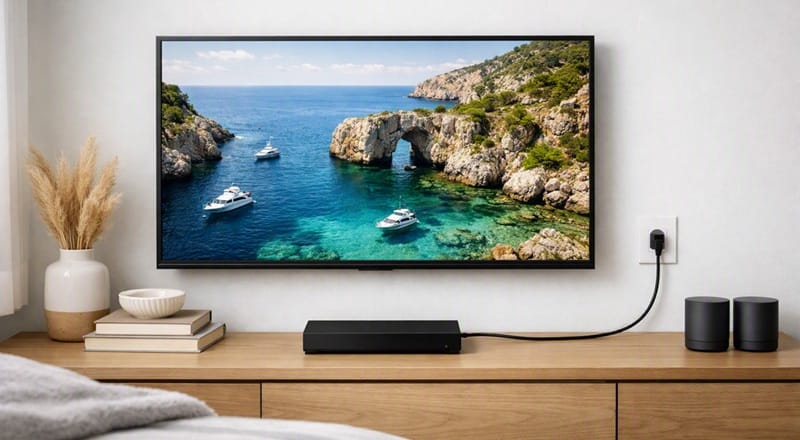
The Frame Pro’s Wireless One Connect box is the more dramatic design upgrade of the two tiers. It moves every port off the panel and onto a separate box that can sit in a cabinet up to 30 feet away, leaving only a power cable running to the wall — the closest either TV gets to looking like an actual framed print.
The standard Frame keeps all four HDMI 2.1 ports built into the back of the panel, with routing channels for cable management instead of a wireless hop. It’s a less dramatic install, but as the next section covers, it also avoids the added lag that comes with the Frame Pro’s wireless connection.
Gaming Performance: The Cheaper Frame Actually Wins This One
Both TVs support FreeSync, HDMI Forum VRR, and G-SYNC Compatible, and both are fully compatible with PS5 and Xbox Series X|S at up to 4K/120Hz with Auto Low Latency Mode. On paper, the gaming feature set is identical between tiers.
In practice, RTINGS found the Frame Pro’s Wireless One Connect box adds considerable latency on its main HDMI inputs — enough that RTINGS called it unsuitable for fast-paced games through that box. The TV’s own direct Micro-HDMI port keeps lag low, but that’s a single port limited to a lower bandwidth than the box’s HDMI 2.1 inputs.
Motion Clarity Follows the Same Pattern
RTINGS’ motion tests found the standard Frame’s response time produces clearer motion than the Frame Pro’s at matching refresh rates — the Frame Pro’s motion measured “very high” blur at its max 144Hz, while the standard Frame’s was more moderate. On responsiveness alone, the cheaper model outperforms its pricier sibling.
Samsung Frame vs. Frame Pro by Use Case
| Use Case | Winner | Why |
|---|---|---|
| Bright-room HDR movies | Frame Pro | Meaningfully higher measured HDR brightness |
| Console gaming | Frame | No Wireless One Connect latency penalty |
| Wall-mounted, cable-free look | Frame Pro | Wireless One Connect leaves only a power cable |
| Mostly Art Mode, occasional viewing | Frame | Nearly identical DCI-P3 coverage (86% either way) for less |
| Dark-room movie nights | Frame Pro | Weak local dimming still beats none at all |
Which Should You Buy?
For most buyers who split their time between watching content and running Art Mode, the Frame Pro’s brightness advantage is the more noticeable upgrade day to day, and it’s the pick worth the premium if HDR movies and bright-room viewing matter to you.
If your priority is gaming — especially fast-paced titles where input lag and motion clarity show up on screen — the standard Frame’s built-in ports avoid the Wireless One Connect penalty entirely, and RTINGS’ own motion testing gives it the edge over its pricier sibling.
If the wall stays mostly in Art Mode with occasional viewing, the color gap is thin enough to make the base Frame the sensible pick: RTINGS measured 86.16% DCI-P3 coverage on the Frame against 86.45% on the Frame Pro, under a one-point difference for a lower entry price.
📍 Brightness and gaming responsiveness aren’t the only things that matter in a TV purchase. If neither Frame tier fits what you actually need, our best 4K TVs of 2026 picks cover the rest of the field.
Samsung QN55LS03HE vs QN55LS03H: Common Questions
Is the Samsung QN55LS03H (Frame Pro) Better Than the QN55LS03HE for Watching TV?
For HDR content, yes — RTINGS measured the Frame Pro’s peak HDR brightness at roughly 80% higher than the standard Frame’s, and its local dimming, weak as it is, still beats having none. For SDR content and everyday viewing, both TVs get bright enough to handle typical glare, so the difference is far less noticeable outside of HDR scenes.
Is the price jump from Frame to Frame Pro worth it?
Judge it by what you’ll actually notice, not the full spec sheet: brightness and local dimming are the two genuine gains from paying for the Frame Pro, based on RTINGS’ Frame Pro testing. Refresh rate, VRR support, and measured color coverage all land close enough between the two models that the step up is really a bet on how often HDR content in a bright room matters to you.
Does the Wireless One Connect box cause any real problems?
The main issue RTINGS flagged is gaming latency, not reliability — connecting through the box adds noticeable input lag versus a direct port. Picture quality itself isn’t affected by which connection method you use.
What Would It Take to Close the Input Lag Gap on a Future Frame Pro?
A structural fix, not a software one — RTINGS traced the added lag to the wireless transmission step itself between the box and the panel. Unless Samsung redesigns how that link works, the same trade-off would carry over to future Frame Pro generations built the same way — which is why the direct Micro-HDMI port on today’s model is the practical workaround right now, not something a future update resolves.
Do the Frame and Frame Pro use the same QLED panel technology?
Not exactly. Both use a Quantum Dot layer over a VA LCD panel, but they’re not the same generation — RTINGS’ panel testing found the Frame Pro’s structure is nearly identical to Samsung’s own QN80H Neo QLED panel, while the standard Frame uses an older Dual LED design with less tightly isolated color primaries. It’s a real difference, but a subtle one outside of lab measurements.

iYaiii
Editor, GearPulse360
iYaiii is the editor and founder of GearPulse360, specializing in TV reviews and consumer electronics. He researches every recommendation before publishing.
✅ Based on Samsung’s official specifications and RTINGS data — last verified August 2026