Sony Google TV Lag After Update: What’s Actually Slowing It Down and How to Fix It
Last updated: July 2026
🕒 8 min read
Disclosure: GearPulse360 participates in the Amazon Associates Program. This particular article contains no affiliate links; other content on our site may.
Your Sony TV finished installing an update overnight, and now it feels like a different TV than the one you had yesterday — just a worse one. You didn’t add any new apps, you didn’t change a single setting, and yet everything from opening Netflix to typing in a search box takes noticeably longer than it did before the update.
Nothing else about your setup changed, so the update looks like the obvious cause. Sony Google TV lag after an update is a genuinely common report, and based on Sony’s support documentation on how Google TV handles system updates, most of it traces back to a temporary rebuild process rather than a defect — though a smaller share of cases do point to something worth actually fixing.
Below, we break down exactly what your Sony Google TV is doing behind the scenes right after an update, how many days that process should reasonably take, and the specific settings to check if it’s still dragging past that point. If your Sony OLED has also been cutting out entirely, that’s a related but separate issue covered in Sony OLED keeps shutting down.
A set that restarts instead of just going dark is a slightly different pattern, one we walk through separately in Sony TV random restart freeze. Lag is also just one item on a longer list of things that can shift after an update — menu layouts, CEC behavior, and Bravia Core included — which our broader look at Sony OLED firmware update problems covers in full.
A slow-to-change channel is its own pattern too, separate from the interface-wide lag this guide focuses on, and it’s worth understanding on its own terms — see Sony TV channel change delay for what typically causes that and when it’s actually worth troubleshooting.
Table of Contents
The Short Answer
Most Sony Google TV lag after an update is temporary. The system is typically syncing queued app updates from the Google Play Store and rebuilding its app cache, both of which briefly compete for the same processor and storage headroom your remote commands need. That settles down within a day or two for most owners. If the slowdown continues past that window, low storage or a stuck background process is the more likely explanation — and that’s fixable without a factory reset.
What Happens to a Sony Google TV Right After an Update
The System Rebuilds Its App Cache
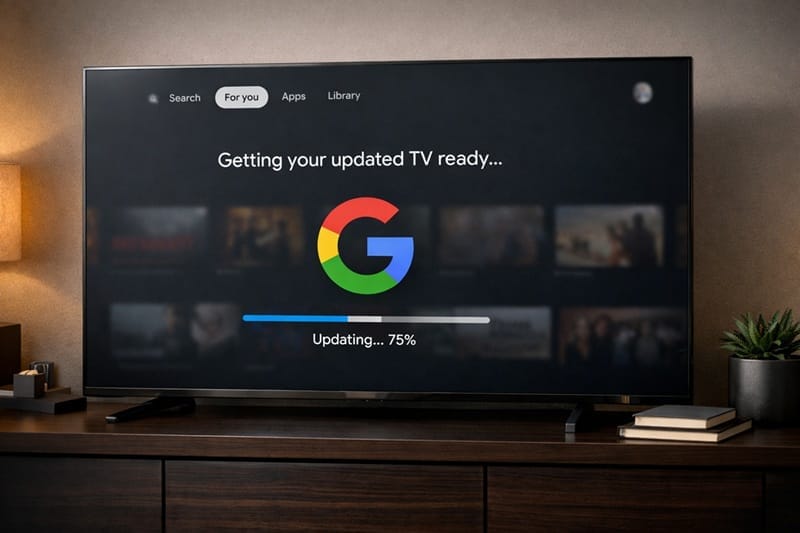
A firmware update on a Sony Google TV doesn’t just replace the operating system. In the background, the system also works through rebuilding parts of its app cache over the following day or so — a common pattern on Android-based smart TV platforms generally — which tends to make the home screen and app-switching feel a step slower than usual right after the update finishes.
Background App Updates Compete for Bandwidth
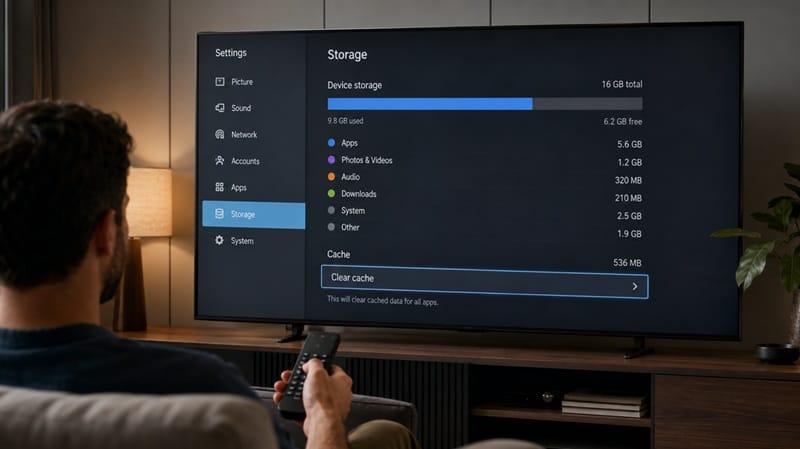
At the same time, the Google Play Store can queue its own batch of app updates once your TV reconnects after a system update, and if that’s happening, those downloads share the same limited processing and storage headroom the interface uses. Sony’s support documentation confirms that cached data accumulating across apps can slow those apps down over time, and clearing it is one of the more effective fixes available. Sony’s guide to clearing app data and cache walks through where that setting lives on current Google TV models.
When It’s Normal vs. When It’s a Real Problem
Signs This Is Temporary
If the lag shows up within the first day of an update and gradually improves the more you use the TV, that lines up with the cache-rebuilding pattern described above. A slightly slower home screen for a day or so after a major update is common, and on its own isn’t a sign anything is wrong with the hardware.
Signs Something’s Actually Wrong
Lag that hasn’t improved after several days, or that comes paired with apps crashing outright, usually points somewhere else — most often storage that’s nearly full, or one specific app that didn’t update cleanly. None of this reflects a panel-level defect; software slowdown and hardware issues run through completely separate channels, which matters if you’re also researching something like Sony OLED warranty denied claims, since a sluggish interface on its own isn’t the kind of issue warranty coverage addresses either way.
This kind of post-update dip shows up across Sony’s whole current Google TV lineup — it isn’t something switching to a different Sony model would sidestep. Our best OLED TVs of 2026 roundup looks at how each brand’s smart TV platform holds up over the long run, not just how it performs on day one.
How to Fix Persistent Sony Google TV Lag
If the slowdown hasn’t cleared up after a few days, work through these steps in order — the first two address the most common causes.
[SCF-1] Symptom → Cause → Fix
| SYMPTOM | LIKELY CAUSE | FIX | DIFFICULTY |
|---|---|---|---|
| Home screen and menus feel slow across every app | Internal storage running low, leaving little room to manage cache | Check Settings → System → Storage, then uninstall unused apps or move content to external storage | Easy |
| One specific app is slow to open or crashes | That app’s cache or data didn’t update cleanly | Go to Settings → Apps → See all apps, select the app, then clear cache before clearing data | Easy |
| Remote input feels delayed across the whole interface | Background app updates from the Play Store still installing | Open Google Play Store → Manage apps & games → Updates, and let pending installs finish | Easy |
| Lag persists after storage, cache, and updates are all clear | A stuck system process left over from the update itself | Fully restart the TV by holding the power button — not just standby | Medium |
If the issue persists after trying these steps, contact Sony support directly.
If none of that resolves it after a full restart, a factory reset is the last step worth trying before contacting Sony support, since it clears out anything the update process may have left in an inconsistent state.
What This Means for You in Practice
Who Should Pay Attention to This
If you’re deciding between Sony and another brand and long-term software performance is part of that decision, our Sony OLED buying guide covers how the current lineup’s processors handle Google TV differently across price tiers.
Who Doesn’t Need to Worry
If your TV feels normal again within a day or two of the update and nothing else changed, there’s nothing left to troubleshoot. That’s the expected pattern, not an early sign of a bigger issue.
FAQs: Sony Google TV Lag After Update
Why does my Sony Google TV lag after an update?
Sony Google TV lag after an update almost always comes down to the system rebuilding its app cache and syncing queued app updates in the background, which briefly competes with your remote commands for the same resources. Sony’s Google TV implementation is generally well-regarded — RTINGS ranks the Sony BRAVIA 8 II OLED as the best Google TV overall — so a few sluggish days after an update reflects normal platform behavior rather than a weak smart TV experience.
Does Sony ever release updates that fix lag instead of causing it?
Yes — Sony ships performance-focused firmware updates alongside feature updates, and those can measurably speed up menus and app launches on supported models. What an update can’t remove is the brief adjustment period right after installation, since that’s a byproduct of the update process itself rather than something a later patch is meant to fix.
How long should it take for my Sony TV to speed back up after an update?
Most owners see performance return to normal within a day or so, once background cache rebuilding and any queued app updates finish. If it’s still noticeably slow well past that point, treat it as a storage or cache issue rather than something that will resolve on its own.
Should I turn off automatic updates to avoid this lag?
Turning off automatic updates trades a few days of post-update slowdown for missing security patches and bug fixes, which usually isn’t worth it. If update timing matters to you, our Sony OLED roundup covers which current models handle background processing with less noticeable slowdown.
Does this lag mean my Sony TV is getting close to the end of its useful life?
No — this kind of lag is a software pattern, not a sign of aging hardware. A brand-new Sony Google TV and one that’s several years old both go through the same cache-rebuilding dip after an update, and a TV genuinely nearing the end of its useful life shows different signs first, like apps that stop receiving updates altogether.

iYaiii
Editor, GearPulse360
iYaiii is the editor and founder of GearPulse360, specializing in TV reviews and consumer electronics. He researches every recommendation before publishing.
✅ Cross-checked against Sony’s support pages and RTINGS data — last verified July 2026