LG OLED Dead Pixels: What They Are and What to Do If You Find One
Last updated: July 2026 | 🕒 8 min read
Disclosure: As an Amazon Associate I earn from qualifying purchases. This article contains affiliate links — we may earn a small commission if you buy through them, at no extra cost to you.
You’re halfway through a dark scene, and there it is — a tiny dot that shouldn’t be there, sitting in the exact same spot every time the picture goes dark. Your stomach drops a little. Did you just pay a lot of money for a TV with a dead pixel?
That’s usually the moment people search for LG OLED dead pixels, and the honest answer is: it depends on what you’re actually looking at. Not every spot on an OLED panel is a dead pixel, and not every dead pixel means your TV is defective in a way LG has to fix.
This guide covers what LG OLED dead pixels actually look like, why they happen, and what determines whether LG will replace the panel. Before you assume the worst, it’s worth running an OLED pixel refresh explained in this guide, since LG’s own maintenance cycle corrects a surprising number of minor pixel issues without any repair at all.
Table of Contents
The Short Answer
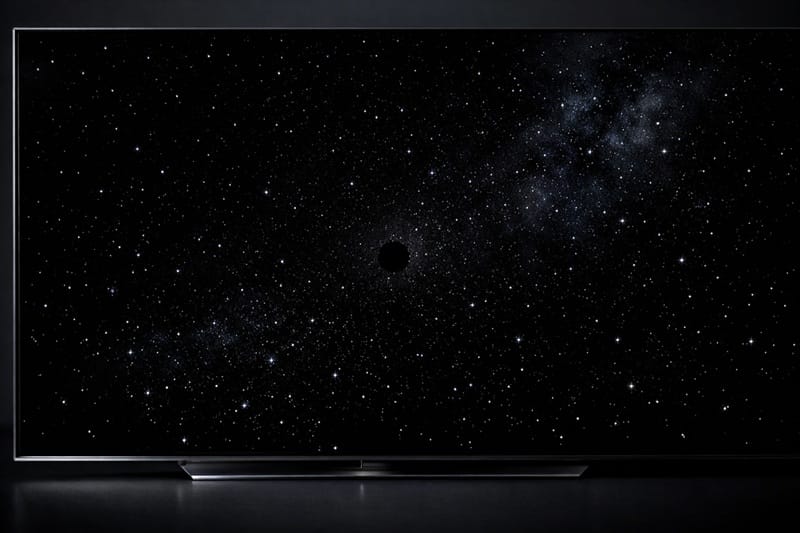
LG OLED dead pixels are rare but real: they show up as a fixed dark or bright dot that doesn’t change with the picture. Most spots people report, though, turn out to be dust under the panel’s outer layer, temporary image retention, or a stuck sub-pixel that can sometimes be corrected. LG generally only treats a spot as a warranty-eligible defect once it meets an internal pixel-count and location threshold, not on a single-dot basis. If what you’re seeing is more of a cloudy haze that shifts under different lighting rather than a fixed dot, that’s usually unrelated to the pixels themselves — see our guide on the LG OLED anti-glare filter problem for that specific scenario.
What a LG OLED Dead Pixel Actually Looks Like
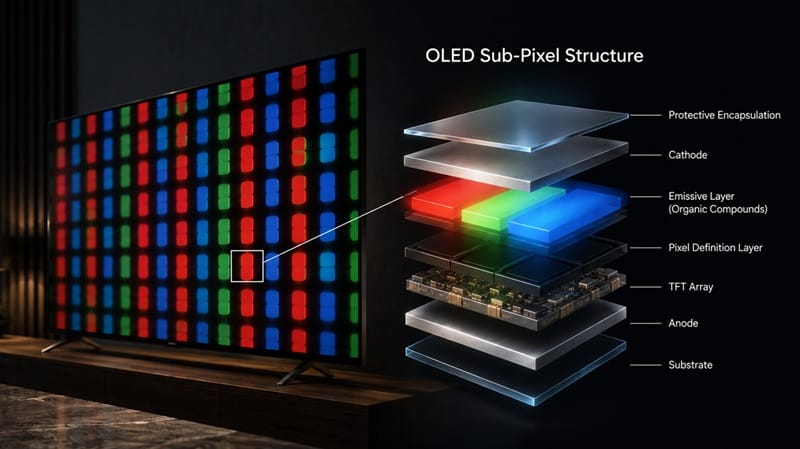
An OLED panel is made of millions of individually lit sub-pixels, and according to LG’s own troubleshooting documentation, a handful of them can fail in different ways that look similar to the naked eye but aren’t the same problem.
The easiest way to check what you’re seeing is to switch to a full black or full white screen and look closely at the spot. A dead pixel on an LG OLED stays exactly the same regardless of what’s playing behind it, while dust, reflections, and retention all shift or fade depending on the content and the angle you’re viewing from.
Dead Pixel vs. Stuck Pixel vs. Dust or Debris
LG’s support documentation explains that a dark or dead pixel is caused by a transistor that has stopped working entirely, so that spot never lights up again. This type generally can’t be corrected through software. A stuck or bright pixel behaves differently: a transistor malfunction lets light through when it shouldn’t, so the dot stays lit or shows the wrong color even in dark scenes. The same guidance notes that some visible spots are simply dust or debris trapped near the panel surface, which isn’t a pixel issue at all and doesn’t require a warranty claim. For an official breakdown of each type, LG publishes a pixel outage troubleshooting guide that walks through the differences.
Why LG OLED Panels Develop Dead Pixels in 2026
OLED manufacturing packs an enormous number of self-lit sub-pixels onto a single sheet, and even with tight quality control, a small percentage of panels ship with a handful of transistor defects that weren’t visible during factory testing. Current-generation LG OLED panels are generally understood to use the same core manufacturing process as previous years, so this isn’t a new risk specific to 2026 models. It’s an ongoing tolerance issue across the whole OLED category. Others are believed to develop later from a combination of heat cycling, panel aging, or physical stress during shipping, though LG doesn’t publish a detailed technical breakdown of post-sale causes.
Manufacturing Tolerance vs. a Genuine Defect
Most manufacturers, including LG, build in a certain tolerance for minor pixel imperfections rather than treating every panel with a single anomaly as faulty. That’s a separate issue from screen retention vs burn-in, which involves temporary or permanent dimming from repeated content rather than an individual pixel failing outright. It’s worth ruling that out first, since the fix (and the urgency) is completely different.
If a confirmed dead pixel has you leaning toward a replacement or a different model, our best OLED TVs of 2026 roundup ranks the current lineup by picture quality, reliability track record, and price so you’re not choosing blind.
Does LG’s Warranty Actually Cover Dead Pixels?
This is usually the real question behind the search. LG doesn’t publish an exact pixel-count number for TVs the way it does for some of its monitors, but its published support guidance points to an assessment based on how many pixels are affected and where they sit on the screen, rather than covering a single dot automatically. A dot tucked in a corner is treated differently than a cluster near the center of the screen.
Keep your proof of purchase and note the date you first noticed the issue, since both details are usually requested during a claim and can affect whether it falls inside the standard warranty window or a retailer’s own return policy instead.
This is one of the more common questions we get from readers of our LG OLED roundup: documenting the problem with clear photos or video against a black or dark gray background before contacting support is the single most useful thing you can do, since it gives LG’s team something concrete to assess instead of a verbal description.
What This Means for You in Practice
Who Should Pay Attention to This
If you’ve spotted a fixed dot that stays in the same place across different content and different brightness levels, document it and reach out to LG support, especially if the TV is still under its manufacturer warranty. Anyone shopping for their first LG OLED and weighing panel-defect risk against features should also start with our LG OLED buying guide, which covers model-by-model differences beyond just the risk of a stray pixel.
Who Doesn’t Need to Worry
If the spot only appears on certain content, shifts position, or fades within a few minutes of switching to a bright, varied scene, you’re very likely looking at temporary image retention rather than an LG OLED dead pixel. That resolves on its own and isn’t something LG needs to see.

FAQs: LG OLED Dead Pixels
Are LG OLED dead pixels common in 2026?
They’re uncommon relative to the number of panels LG ships, but not unheard of. According to RTINGS’ guidance on TV warranty coverage, manufacturing defects of this kind are one of the main things a standard warranty is designed to catch in the first year of ownership.
Is a dead pixel the same as burn-in?
No. A dead pixel is the single-transistor failure described above, while burn-in is gradual, uneven wear across many pixels from repeated static content over time. They can look similar from a distance, but the cause and the fix are different.
Can a dead pixel on an LG OLED spread over time?
A true dead pixel — one caused by a failed transistor — is generally understood to stay isolated rather than spread, since it’s a single point failure rather than a wider panel issue. That said, LG doesn’t document this behavior explicitly, so treat it as a general expectation rather than a guarantee. If the affected area is growing, that points more toward a broader panel or driver board problem worth flagging to LG directly rather than a simple pixel defect.
Should I buy an LG OLED if I’m worried about dead pixels?
The risk of a dead pixel exists across every OLED brand, not just LG, and it’s a small enough occurrence that it shouldn’t be the deciding factor over picture quality, gaming features, or price. If it would still put your mind at ease, buying from a retailer with a generous return window gives you an easy path to a replacement if something does show up in the first few weeks.
How do I run a pixel refresh to check for a stuck pixel?
LG OLED TVs include a built-in pixel refresh option in the settings menu — the same one covered in the pixel refresh guide linked earlier in this article. It corrects minor stuck-pixel issues but won’t do anything for a true dead pixel, so it’s a quick first step before assuming the worst.

iYaiii
Editor, GearPulse360
iYaiii is the editor and founder of GearPulse360, specializing in TV reviews and consumer electronics. He researches every recommendation before publishing.
✅ Based on spec analysis and RTINGS data — last verified July 2026