TCL Google TV Freezing or Stuck in a Reboot Loop? Here’s What’s Actually Happening
Last updated: July 2026
🕒 7 min read
Disclosure: GearPulse360 participates in the Amazon Associates Program. This particular article contains no affiliate links; other content on our site may.
You turn the TV on and the TCL logo appears, holds for a few seconds, then the screen goes black — and a moment later, the same logo shows up again. And again. Sometimes it breaks the cycle and boots normally; sometimes it doesn’t. That repeating cycle is what most people mean by a TCL Google TV freezing reboot loop, and it shows up more often than you’d expect from a TV that worked fine the day before.
Based on TCL’s own Google TV troubleshooting documentation and Google TV’s platform-level support guidance, freeze-and-restart patterns on these sets typically trace back to the software layer rather than a failing panel or motherboard — worth knowing before you assume the TV itself is dying.
Below: the difference between a one-off freeze that clears itself and a true reboot loop that never completes startup, what typically causes each, and the exact steps to try before contacting support. If your set is sluggish or unresponsive rather than stuck cycling on the logo, our piece on why a Hisense TV keeps freezing and restarting walks through the same software mechanisms on a different platform — the diagnostic logic carries over.
Table of Contents
The Short Answer: What’s Behind a TCL Google TV Freezing Reboot Loop
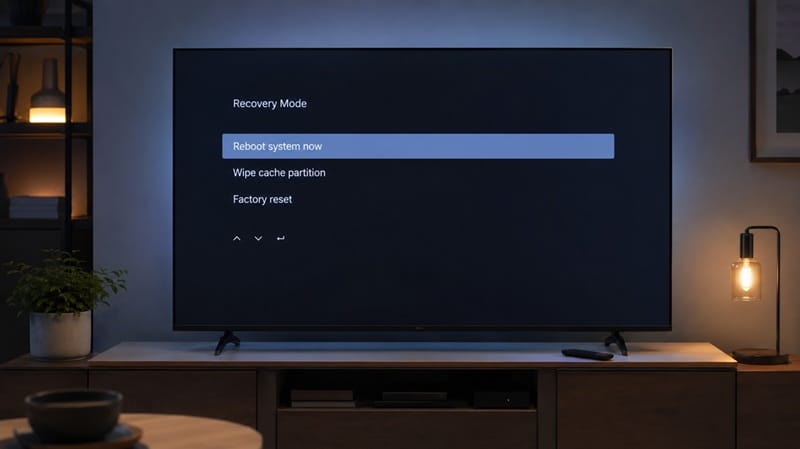
A TCL Google TV freezing reboot loop is almost always caused by an interrupted software update, a corrupted cache, or a system process that’s stuck rather than a hardware defect. TCL’s Google TV sets include a built-in recovery mode for exactly this scenario, and selecting “Reboot system now” from that menu resolves the pattern in most cases. A hardware cause only becomes the likely explanation if the loop survives a full factory reset.
What Causes a TCL Google TV to Freeze or Loop on Restart
A Freeze Isn’t the Same Problem as a Loop
These two symptoms get lumped together, but they point in different directions. A freeze is the TV hanging on one screen — an app, the home screen, a paused video — without crashing outright. A reboot loop is a separate failure: the TV restarts on its own, gets partway through startup, and restarts again before reaching a usable screen. According to Google TV’s own platform support guidance, a simply frozen device usually clears with a basic power cycle; one that won’t stop restarting points to a deeper interruption in the boot process.
Where the Interruption Usually Starts
Most loops trace back to one of a few triggers: a firmware update that didn’t finish installing, a corrupted app cache that the system keeps trying and failing to load on startup, or — less commonly — a full storage partition that leaves no room for the TV to complete its normal boot checks. None of these require a technician visit to fix, which is why TCL routes owners through recovery mode before anything more drastic.
An interrupted update doesn’t always show up as a freeze or a loop, either. Sometimes that same update process leaves the TV’s local Google sign-in token corrupted instead of the boot sequence — a different symptom worth knowing about if your TCL TV Google account keeps logging out after update rather than freezing outright.
TCL’s Built-In Recovery Layer Exists Because This Is Common
What Recovery Mode Actually Does
TCL Google TVs ship with a separate recovery menu, distinct from a normal restart, that owners can reach even when the TV won’t boot past its logo screen. From that menu, “Reboot system now” is the first thing to try — a clean, non-destructive restart attempt that doesn’t touch any saved settings, accounts, or installed apps. Interrupted boots happen often enough on Android-based smart TV platforms that manufacturers build a dedicated recovery path for them, instead of treating every stuck boot as a warranty case.
TCL’s picture quality against pricier panel types is a separate question from how reliable the software feels day to day — we cover that comparison in our breakdown of whether TCL Mini-LED looks as good as OLED.
When the Pattern Points Somewhere Else
Recovery mode isn’t a guaranteed fix, and that gap is itself informative. If “Reboot system now” clears the loop, the cause was almost certainly software. If the TV keeps returning to the recovery screen on its own, or the loop survives a factory reset from that same menu, the explanation shifts toward a hardware fault — most often a memory or storage component, not the display panel. If that turns into a warranty repair and the set starts shutting off on its own afterward, that’s a related but separate pattern worth checking against our guide to TCL TV randomly turns off after warranty repair.
If you’ve worked through recovery mode and a factory reset with no luck, and you’re starting to look at other options, our best 4K TVs of 2026 roundup is a reasonable next stop for comparing current picks by size and budget.
Fixing It: What to Try Before You Contact Support
The steps below go roughly in order from least to most disruptive. Start at the top and only move down if the previous step didn’t resolve the freeze or loop.
Symptom → Cause → Fix
| SYMPTOM | LIKELY CAUSE | FIX | DIFFICULTY |
|---|---|---|---|
| TV freezes on the TCL or Google TV logo, never completes boot | Interrupted startup, often from a partial system update | Enter recovery mode and select “Reboot system now” before trying anything else | Easy |
| TV restarts repeatedly, never reaches the home screen | Corrupted cache partition or a stuck update process | From recovery mode, clear the cache partition if listed, then try a factory reset if needed | Medium |
| Freezing happens only inside specific streaming apps | App-level cache buildup or an outdated app version | Force stop the app, clear its cache under Settings > Apps, then update it from the Play Store | Easy |
| Loop continues even after a full factory reset | Likely a hardware fault in memory or storage, not the panel | Stop troubleshooting and contact TCL support for a warranty diagnostic | Hard |
If the issue persists after trying these steps, contact TCL support directly.
What This Means for You in Practice
Who Should Try These Fixes First
If your TV is freezing intermittently or cycling on the logo screen but you haven’t touched recovery mode yet, start there — it’s non-destructive and doesn’t touch your settings or accounts, which makes it worth trying before anything else. This applies across TCL’s Google TV lineup: the recovery-mode behavior and the underlying software layer work the same way regardless of screen size or panel tier, as long as the set is running Google TV.
Who Doesn’t Need to Worry
A single freeze that clears after one power cycle isn’t a sign of a bigger problem; every Android-based smart TV platform has occasional hiccups like this. Unless the pattern repeats or the TV consistently fails to finish booting, there’s no reason to assume you’re looking at a failing unit.
FAQs: TCL Google TV Freezing and Reboot Loop
What causes a TCL Google TV freezing reboot loop?
It’s most often an interrupted software update, a corrupted cache, or a stuck boot process. Hardware failure is possible but far less common. TCL’s own recovery mode troubleshooting guide walks through the same “Reboot system now” step recommended above as the first thing to try.
Does a reboot loop mean my TCL TV’s panel is failing?
No. A reboot loop is a startup-process problem — the panel and the boot software are separate systems, so a TV stuck cycling on its logo can still have a completely healthy screen underneath it.
Will a factory reset erase everything on my TV?
Yes. A factory reset from recovery mode wipes installed apps, saved accounts, and custom settings, returning the TV to its out-of-box state. That’s exactly why it’s positioned as a later step rather than a first attempt — the non-destructive “Reboot system now” option should always be tried first.
Should I return the TV if it keeps freezing?
Not immediately. Work through the recovery-mode reboot and, if needed, a factory reset first — those two steps resolve most freeze and loop cases without any escalation. If the loop survives a factory reset, that’s the point to contact TCL support for a warranty diagnostic rather than continuing to troubleshoot on your own. Some owners in this exact position end up looking at a different smart TV platform entirely — our breakdown of TCL owners switching to Roku TV after Google TV problems covers what that switch actually changes, and what it doesn’t.
Is this problem specific to certain TCL models, or all Google TV sets?
It’s a platform-level pattern tied to Google TV’s software rather than any specific screen size or panel type. Any TCL model running Google TV can experience it, and the same recovery-mode process applies across the lineup.

iYaiii
Editor, GearPulse360
iYaiii is the editor and founder of GearPulse360, specializing in TV reviews and consumer electronics. He researches every recommendation before publishing.
✅ Based on TCL’s official support documentation and Google TV’s platform guidance — last verified July 2026